How to Use AI SQL Query Editor
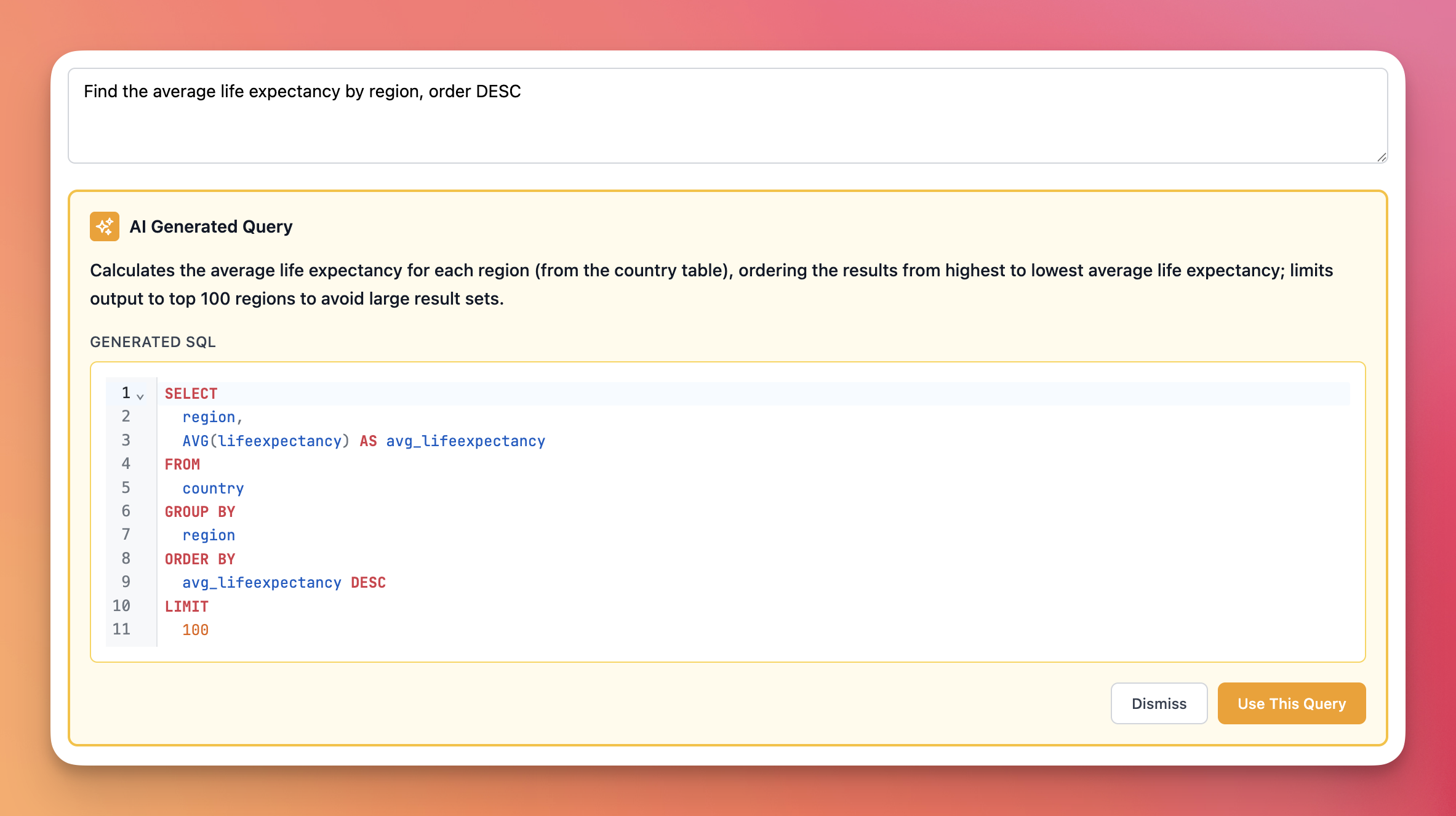
The AI query editor in Indiequery lets you write SQL queries using plain English instead of SQL syntax. It's powered by OpenAI and understands your database schema automatically.
Opening the AI Builder
When you open a query in Indiequery, you'll see two tabs at the top of the editor:
- SQL Mode - The regular SQL editor
- AI Builder - The natural language query generator
Click "AI Builder" to switch to the AI-powered interface.
Writing Your Query Instructions
In the AI Builder, you'll find a text box where you describe what data you want. Write your request in plain English:
- "Show me all users who signed up last month"
- "Find the top 10 products by revenue"
- "Get customers with more than 5 orders"
The AI uses your database schema to understand which tables and columns exist, so you don't need to specify exact table names.
Generating the Query
Once you've written your instructions:
- Click "Generate Query"
- Wait a few seconds while the AI processes your request
- Review the generated SQL and the AI's explanation
The AI will show you:
- A plain-English explanation of what the query does
- The complete SQL query, formatted and ready to run
Using the Generated Query
You have two options:
Use This Query - Transfers the SQL to your main editor where you can run it or modify it further
Refine Instructions - Keep your original instructions visible so you can adjust them and regenerate
Tips for Better Results
Be specific about what you want. Instead of "show users", try "show active users from the last 30 days".
Mention sorting and limits. The AI will add appropriate LIMIT clauses, but you can specify: "top 10 by price" or "ordered by date descending".
Reference your current SQL. If you already have a query in the editor, the AI uses it as context. You can ask it to "add a filter for status = active" or "sort by date".
Context Awareness
The AI Builder is context-aware. When you have SQL already in the editor and switch to AI mode, your current query provides context. This means you can:
- Ask the AI to modify your existing query
- Request additional filters or sorting
- Have it complete a partially-written query
Rate Limits
To prevent excessive API usage, there's a limit of 10 AI query generations per minute per user. If you hit this limit, wait a moment before trying again.
What Queries Can It Generate?
The AI Builder only generates read-only SELECT queries. Indiequery is a read-only database explorer, so the AI won't create INSERT, UPDATE, DELETE, or schema-modification queries.